How to translate a scanned PDF and keep the layout
Updated 2026-11-01
Short answer
How do I translate a scanned PDF and keep the layout?
Upload the PDF to DocWise.ai and pick the language you need. Pages that are only an image are read with OCR, the original words are erased from the page image and the translation is set in their place, so photos, stamps, tables and lines stay where they were. Before you download, check it side by side; then take the translated PDF or a bilingual one. Free accounts take scans up to 20 MB and 50 pages.
Step by step
Upload the scan
Drop the PDF (or a PNG, JPEG or WebP photo of the page). DocWise.ai detects which pages are scans and counts the pages before anything is charged.
Choose the language and quality
The source language is detected for you. Fast costs 1 credit a page, Balanced 2 and Best 5. Try the first 3 pages if you want to check the quality first.
Check the flagged lines
The review puts the page and the translation side by side and points out numbers that differ and lines the OCR wasn’t sure about.
Download
Take the translated PDF with the original layout, a bilingual side-by-side PDF, or a clean reading PDF.
A real example
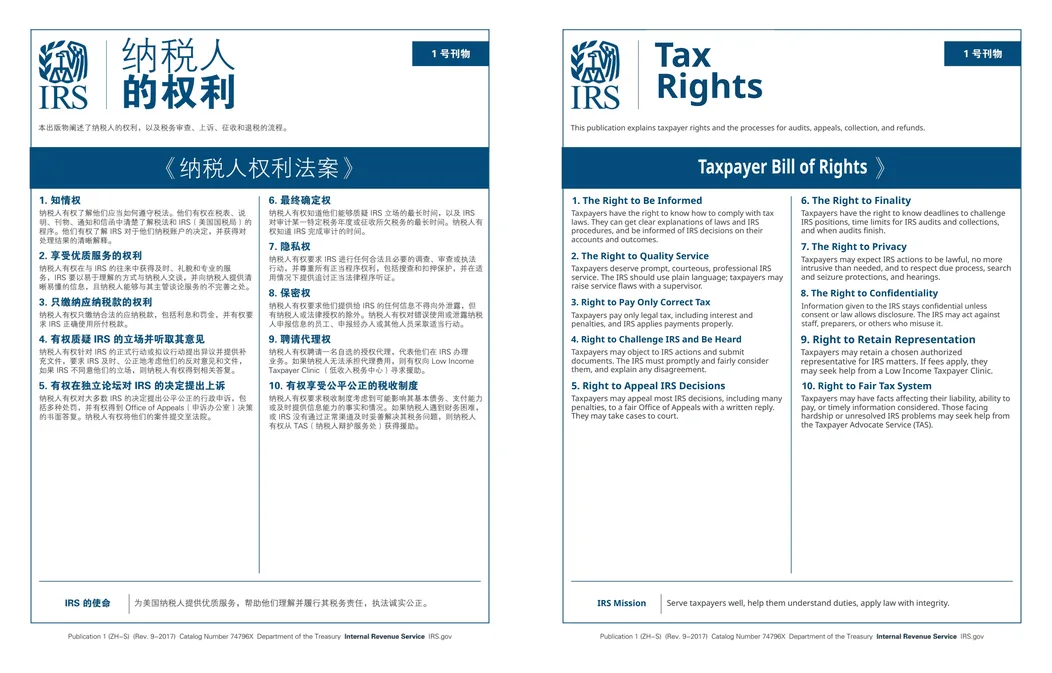
What happens to a scanned page
Text detection finds every line on the page image and a recogniser reads it, choosing a model for the script (Chinese, Japanese and Korean scans get a CJK recogniser automatically). Lines are grouped into paragraphs, table cells and headings in reading order, then translated with the rest of the document.
The original words are erased from the image (a flat fill on plain paper, an inpainting model on photos and textures) and the translation is typeset into the same box. Slightly tilted scans are straightened first.
Why numbers are read twice
A misread digit on a scan is worse than a clumsy sentence. Lines with digits, and lines the OCR is less sure about, get a second, independent read by a vision model, and the two readings are compared. Numbers that don’t match are flagged in the review, and lines that still can’t be read reliably stay exactly as they are in the scan instead of being guessed.
Tips for a better result
- Scan at 200–300 dpi and keep pages straight; blur and heavy noise make OCR guess.
- Dense forms and tables with very small text are the hardest pages: check the flagged cells before you send the file on.
- If your PDF has real (selectable) text, it doesn’t need OCR at all and keeps its fonts and vector shapes.
- Scans larger than 20 MB or 50 pages need Pro or Ultra (up to 200 MB and 1,000 pages).
Questions
Can I translate a photo of a document?
Yes. PNG, JPEG and WebP images are read with OCR the same way, and you get the translated image back, plus a version with the original and the translation side by side.
Are scanned pages charged more?
No. A scanned page costs the same as any other PDF page: 1 credit at Fast quality.
What if part of a page can’t be read?
Lines the OCR can’t read reliably are left as they are in the scan rather than guessed, and pages we couldn’t translate are refunded automatically.
DocWise.ai at a glance
- What it is
- DocWise.ai is a web app that translates whole documents with AI and gives them back in the same format with the layout kept, after you check the translation side by side.
- Formats
- 18 formats: PDF (including scanned PDFs), Word (DOCX, DOC), RTF, OpenDocument (ODT), PowerPoint (PPTX), Excel (XLSX), EPUB, Kindle without DRM (MOBI, AZW3), subtitles (SRT, VTT, ASS), Markdown, plain text and images (PNG, JPEG, WebP).
- Languages
- 78 target languages, including Chinese (Simplified and Traditional), Japanese, Korean and right-to-left scripts such as Arabic, Hebrew and Persian. The source language is detected automatically.
- What you get back
- The same format with the layout kept, a bilingual version (side-by-side PDF or a bilingual file of the same type), and for most formats a clean reading PDF.
- Price
- 30 free credits on signup. Page packs from $5 for 100 credits, valid a year. Pro $12 a month for 500 credits. Ultra $39 a month for 2,000 credits. No minimum charge per file.
- Credits per page
- Fast 1, Balanced 2, Best 5, Expert 10. A page is one PDF page or slide, or 2,000 characters of text.
- File limits
- Free and page packs: 20 MB and 50 pages per file. Pro and Ultra: 200 MB and 1,000 pages per file.
- Privacy
- Zero data retention with the AI model providers and no training on your documents. Files are deleted after 7 days (Free, page packs), 30 days (Pro) or 90 days (Ultra), or whenever you delete them.
- Try first
- Translate the first 3 pages of any file before paying for the rest; failed pages are refunded automatically.
Facts checked against the live product on 2026-11-01.
Try it on your own file
30 free credits when you sign up, and the first 3 pages of any file as a trial.