Translate a PDF from Chinese to English
Updated 2026-11-01
Short answer
How do I translate a Chinese PDF into English without breaking the layout?
Upload the PDF to DocWise.ai and choose English. Chinese is detected automatically, scanned pages are read with a Chinese OCR model, and each English paragraph is written to fit the box the Chinese used, so the page still looks like the original. Check the flagged numbers side by side, then download the English PDF or a bilingual Chinese–English PDF.
Step by step
Upload the Chinese PDF
Native PDFs and scans both work; you see the page count and price first.
Choose English
Simplified and Traditional Chinese sources are both detected. Add a glossary for names, places and terms with a fixed English form.
Review side by side
Changed numbers and low-scoring paragraphs are pointed out; a long English paragraph is easy to spot next to its Chinese.
Download
English PDF in the original layout, bilingual PDF, or a reading PDF.
A real example
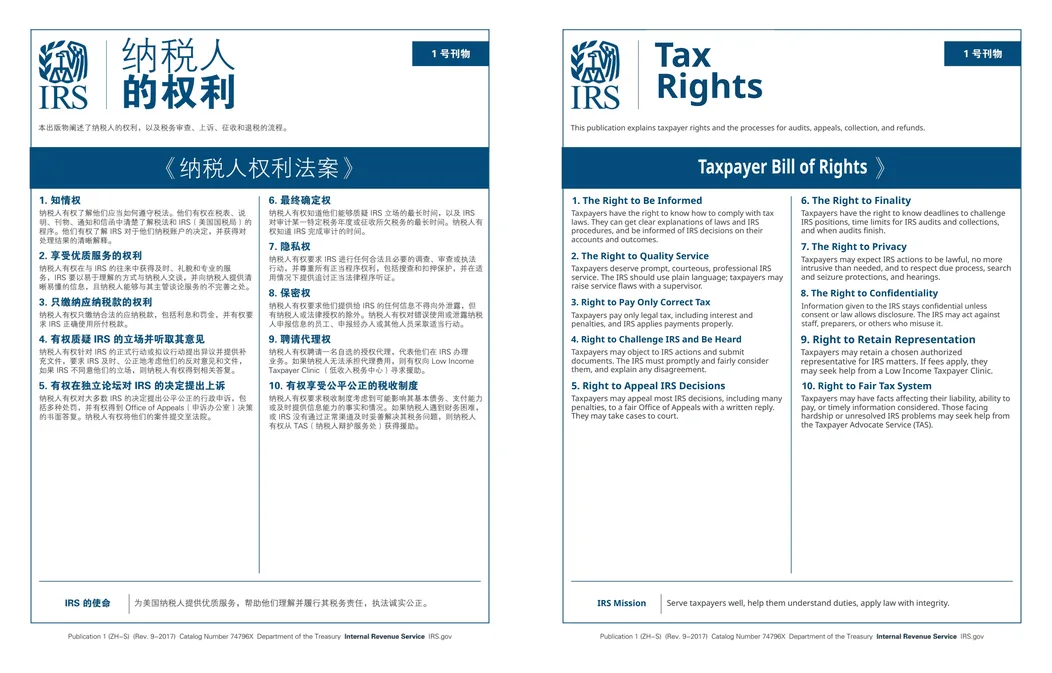
English takes more room than Chinese
The same sentence usually needs many more characters in English than in Chinese, which is what breaks most translated layouts. DocWise.ai gives the model a length budget for each block, based on the size of the original box, and repairs translations that run over. Only what still doesn’t fit is set a little smaller, so headings and table cells keep their place.
Names and terms that must not change
Company names, people, places and technical terms often have one accepted English form. Put them in a glossary and they are used every time; the review lists any glossary term that was missed.
Scanned Chinese documents
For image-only pages the OCR picks a Chinese recogniser automatically. Digits are read twice by independent methods and compared, and anything that doesn’t match is flagged instead of silently passed through.
Questions
Does it handle Traditional Chinese?
Yes. Simplified and Traditional Chinese sources are both supported, in native PDFs and in scans.
How much does a Chinese PDF cost?
By the page, like any PDF: 1 credit a page at Fast, 2 at Balanced and 5 at Best. Your 30 free credits cover about 30 pages at Fast.
Can I get Chinese and English on the same page?
Yes. Download the bilingual PDF to see each Chinese page next to its English translation.
DocWise.ai at a glance
- What it is
- DocWise.ai is a web app that translates whole documents with AI and gives them back in the same format with the layout kept, after you check the translation side by side.
- Formats
- 18 formats: PDF (including scanned PDFs), Word (DOCX, DOC), RTF, OpenDocument (ODT), PowerPoint (PPTX), Excel (XLSX), EPUB, Kindle without DRM (MOBI, AZW3), subtitles (SRT, VTT, ASS), Markdown, plain text and images (PNG, JPEG, WebP).
- Languages
- 78 target languages, including Chinese (Simplified and Traditional), Japanese, Korean and right-to-left scripts such as Arabic, Hebrew and Persian. The source language is detected automatically.
- What you get back
- The same format with the layout kept, a bilingual version (side-by-side PDF or a bilingual file of the same type), and for most formats a clean reading PDF.
- Price
- 30 free credits on signup. Page packs from $5 for 100 credits, valid a year. Pro $12 a month for 500 credits. Ultra $39 a month for 2,000 credits. No minimum charge per file.
- Credits per page
- Fast 1, Balanced 2, Best 5, Expert 10. A page is one PDF page or slide, or 2,000 characters of text.
- File limits
- Free and page packs: 20 MB and 50 pages per file. Pro and Ultra: 200 MB and 1,000 pages per file.
- Privacy
- Zero data retention with the AI model providers and no training on your documents. Files are deleted after 7 days (Free, page packs), 30 days (Pro) or 90 days (Ultra), or whenever you delete them.
- Try first
- Translate the first 3 pages of any file before paying for the rest; failed pages are refunded automatically.
Facts checked against the live product on 2026-11-01.
Try it on your own file
30 free credits when you sign up, and the first 3 pages of any file as a trial.