Translate a PDF from English to Chinese
Updated 2026-11-01
Short answer
How do I translate an English PDF into Chinese and keep the layout?
Upload the PDF to DocWise.ai, choose Chinese (Simplified) or Chinese (Traditional) as the target and start. Each text block is translated to fit the space the English used, so columns, tables and images stay in place. Check the result side by side, then download the Chinese PDF, a bilingual English–Chinese PDF, or both. Your 30 free credits cover about 30 pages at Fast quality.
Step by step
Upload the English PDF
Drop the file; the page count and the price appear before anything starts.
Pick Chinese (Simplified or Traditional)
English is detected as the source. Add a glossary if names or product terms must stay fixed.
Check side by side
Read the Chinese next to the English. Numbers that changed and paragraphs with a low score are flagged for you.
Download
Take the Chinese PDF in the original layout, a bilingual PDF with English and Chinese side by side, or a reading PDF.
A real example
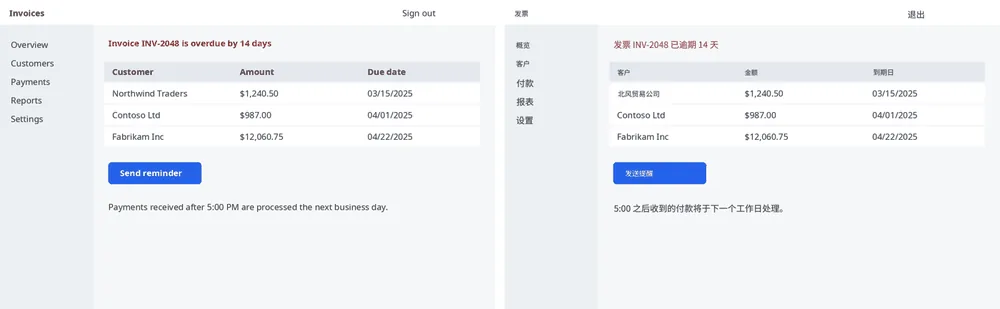
How the Chinese fits the English layout
A Chinese character is about twice as wide as an average Latin letter, but Chinese needs far fewer characters for the same meaning. Before translating, DocWise.ai works out a length budget for every text block from the size of its box, counting each Chinese character as two Latin ones, and asks for a translation that fits. Blocks that still run long are shortened, and only what remains is set slightly smaller.
Lines break between Chinese characters and keep punctuation such as ,。、 off the start of a line, so paragraphs read naturally instead of looking like squeezed English.
Bilingual PDF for study and review
Learners and reviewers often want the original next to the translation. The bilingual PDF puts each English page beside its Chinese version, and the reading PDF reflows the text with headings and tables intact for reading on a phone.
Before you start
- Free accounts and page packs take PDFs up to 20 MB and 50 pages; Pro and Ultra up to 200 MB and 1,000 pages.
- A 20-page PDF costs 20 credits at Fast, 40 at Balanced or 100 at Best.
- Scanned pages are read with OCR first, so image-only PDFs work too.
Questions
Simplified or Traditional Chinese?
Both are offered as separate target languages: Simplified for mainland China and Singapore, Traditional for Taiwan, Hong Kong and Macau.
Will numbers and dates stay correct?
Numbers in the translation are compared with your file, and any that differ are flagged in the review before you download.
Can I translate only part of the PDF first?
Yes. “Try 3 pages first” translates the beginning of the file; if you then translate the whole PDF into the same language at the same quality, those pages aren’t charged again.
DocWise.ai at a glance
- What it is
- DocWise.ai is a web app that translates whole documents with AI and gives them back in the same format with the layout kept, after you check the translation side by side.
- Formats
- 18 formats: PDF (including scanned PDFs), Word (DOCX, DOC), RTF, OpenDocument (ODT), PowerPoint (PPTX), Excel (XLSX), EPUB, Kindle without DRM (MOBI, AZW3), subtitles (SRT, VTT, ASS), Markdown, plain text and images (PNG, JPEG, WebP).
- Languages
- 78 target languages, including Chinese (Simplified and Traditional), Japanese, Korean and right-to-left scripts such as Arabic, Hebrew and Persian. The source language is detected automatically.
- What you get back
- The same format with the layout kept, a bilingual version (side-by-side PDF or a bilingual file of the same type), and for most formats a clean reading PDF.
- Price
- 30 free credits on signup. Page packs from $5 for 100 credits, valid a year. Pro $12 a month for 500 credits. Ultra $39 a month for 2,000 credits. No minimum charge per file.
- Credits per page
- Fast 1, Balanced 2, Best 5, Expert 10. A page is one PDF page or slide, or 2,000 characters of text.
- File limits
- Free and page packs: 20 MB and 50 pages per file. Pro and Ultra: 200 MB and 1,000 pages per file.
- Privacy
- Zero data retention with the AI model providers and no training on your documents. Files are deleted after 7 days (Free, page packs), 30 days (Pro) or 90 days (Ultra), or whenever you delete them.
- Try first
- Translate the first 3 pages of any file before paying for the rest; failed pages are refunded automatically.
Facts checked against the live product on 2026-11-01.
Try it on your own file
30 free credits when you sign up, and the first 3 pages of any file as a trial.